I wanted a use case that wasn't a toy to properly evaluate Power Apps Code Apps — something dense enough to be awkward in a Canvas App, but still a real planning problem. Capacity planning fit well.
What it does
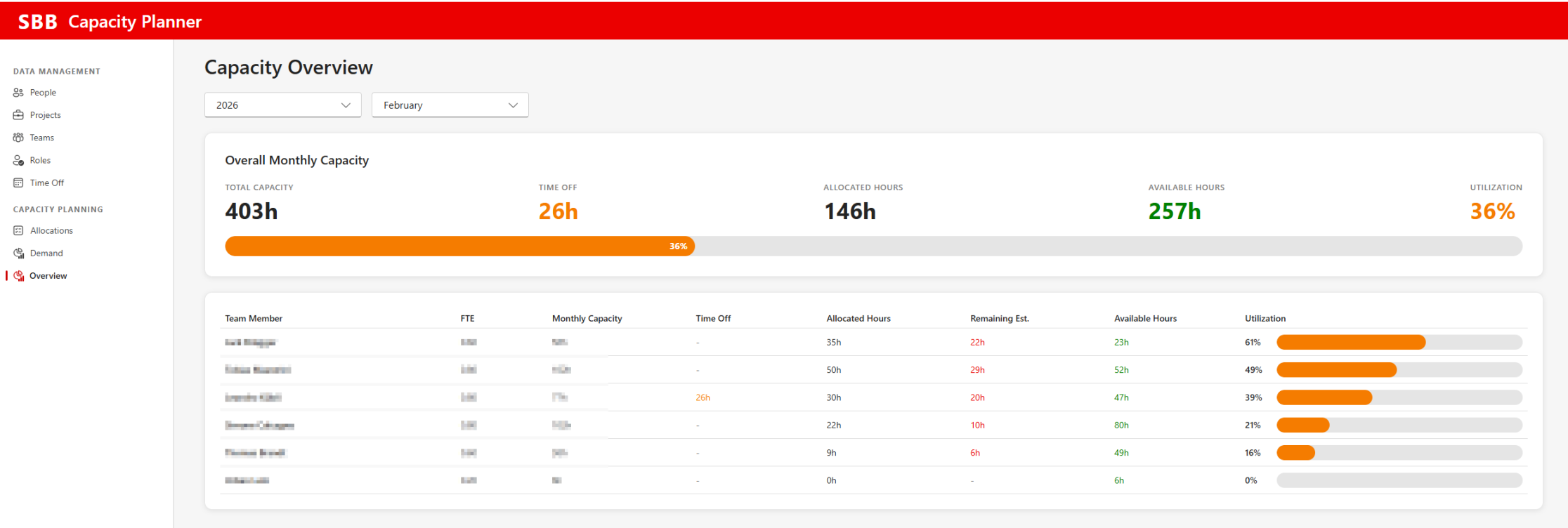
The app splits into data management — people, projects, teams, roles and time off — and capacity planning, covering allocations, demand and an overview.
The overview page aggregates the figures a planning conversation actually needs: total capacity, time off, allocated hours, available hours and a utilization percentage. It then breaks the same numbers down per team member, including FTE, monthly capacity and remaining estimate. Allocation data is synced with Jira items.
How it's built
- Front end as a Power Apps Code App using React and TypeScript
- Dataverse backend across nine tables
- A cloud flow, a connection reference and environment variables in the same solution
- Deployed through Power Platform Pipelines into a Managed Environment
The interesting part isn't the UI — it's that the whole thing stays a normal solution component. The Code App sits in the solution next to its tables and flow, appears in the maker inventory as its own app type, and moves through environments with the same versioned pipeline as everything else.
Why a Code App
A dense, tabular screen with computed columns and progress indicators is exactly the kind of thing that used to force a choice between a Canvas App that fights you and a custom build that leaves the platform behind. With React and TypeScript it's unremarkable work — while hosting, data, ALM and governance stay native to the Power Platform.
I wrote up the platform side of this in more detail — solutions, environment setup, governance and deployment — in my article on Power Apps Code Apps.
A fuller write-up of this project is still in progress — more detail on the data model and planning logic to follow.